A homeowner calls with an audit report in one email, an insulation proposal in another, and a rebate portal asking for a document they cannot identify. They ask the office a simple question: “Do I have everything I need?”
Start by naming the program. Record the administrator, property address, caller’s role, application stage, deadline, reference number, work being considered, and the exact document requested. Then separate the file into three records: the call intake cover sheet, the signed audit report, and the itemized project invoice. Keep tax-credit questions in their own lane. The office can organize and explain its own documents, but eligibility, funding reservation, and approval belong to the program administrator.
Identify the program before asking for paperwork
“Energy rebate” can mean a state-administered federal program, a utility incentive, a local grant, a manufacturer offer, or a prior-year federal tax question. Those paths may involve the same heat pump or insulation job and still ask for different records.
Ask: “What is the exact name of the program or credit?” Follow with the administrator’s name and the web address, letter, email, or portal where the request appeared. Capture the property address, whether the caller owns or occupies the home, who submitted the application, and whether a contractor or auditor has already opened a project file.
The current U.S. Department of Energy Home Energy Rebates page describes separate HOMES and home electrification rebate programs. It also says availability and eligibility details come through participating state, territory, or Tribal programs. A national office checklist cannot replace the administrator’s current instructions.
Record the caller’s stage in plain language. Are they checking eligibility before an audit? Gathering documents for an application? Responding to a correction request? Waiting for a contractor invoice? Appealing a denial? A call about “rebate paperwork” becomes workable once the stage and missing item are visible.
If the caller has not selected a project yet, the pre-upgrade energy audit intake helps define the technical decision first. Documentation intake begins after the office knows which program and which service the caller means.
Keep one intake cover sheet for the whole file
The cover sheet is an index, not evidence that the application qualifies. Give it the exact program name, administrator, property, applicant, reference number, audit provider, contractor, requested measure, current stage, stated deadline, and the source of every requirement.
Copy wording from the administrator’s request. “Need signed report with certification program” is useful. “Need rebate paperwork” is not. If a portal shows a field label or error, ask for a screenshot that excludes passwords, full taxpayer identifiers, bank details, and unrelated account information.
Mark each item as received, missing, unclear, or sent for review. Never turn an assumption into a fact. If the homeowner thinks the utility account number is the rebate application number, preserve both labels until the administrator confirms which one it needs.
The cover sheet should also record communication permission. A homeowner may want the auditor to send a report directly to a contractor or program implementer. Confirm the recipient and approved method before releasing customer documents.
Separate the audit report from the project invoice
An audit report explains the home, assessment, findings, and recommended work. A project invoice records what was actually sold or completed. Combining them into a loose PDF bundle makes missing fields harder to spot.
For the audit side, capture the inspection date, property, responsible auditor, signature status, qualification or certification details, report version, assessment method, findings, proposed measures, estimates, and any customer acknowledgements required by the named program. Ask what the report was meant to support. A general assessment, a modeled HOMES project, a utility form, and a tax-credit audit may use different language.
For the project side, capture the work address, specific scope, contractor name and contact details, service dates, equipment or material identifiers when required, total project cost before the rebate, rebate or incentive shown separately, payment status, and change orders. The DOE’s Version 2.1 program requirements listed the work address, specific work, contractor contact, dates, pre-rebate project cost, and rebate amount among baseline invoice fields. Treat that as useful file anatomy. The live program may add, remove, or rename fields.
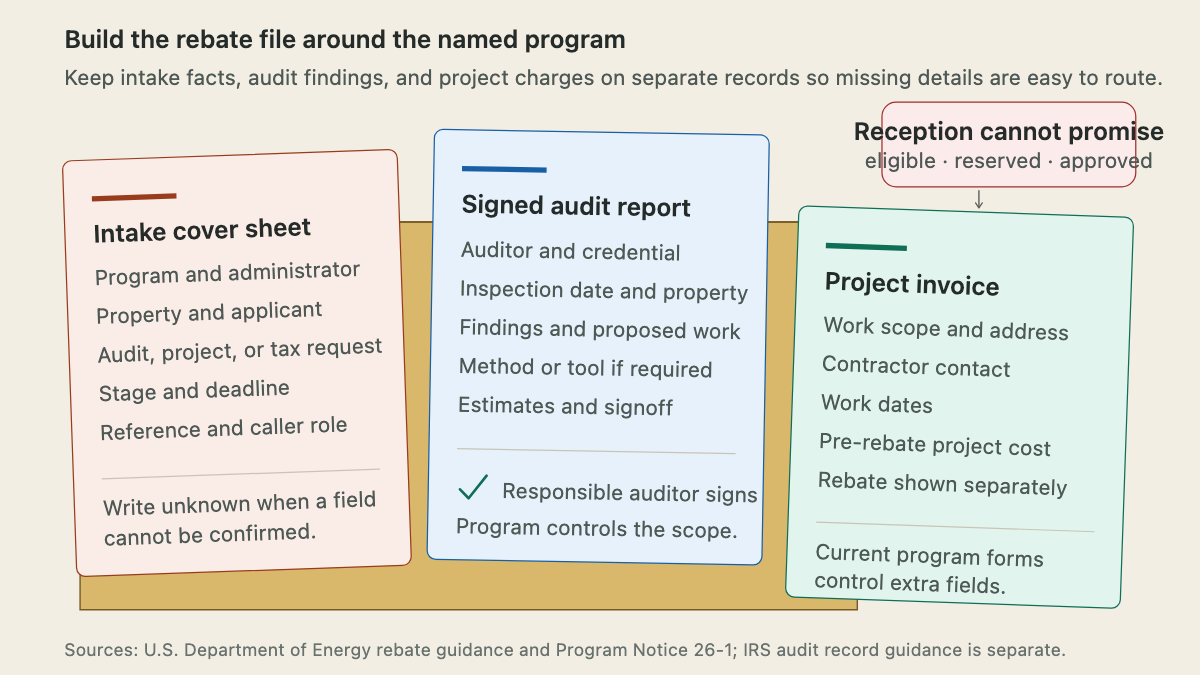
The picture also marks the office boundary. Reception can confirm that the company’s invoice includes an address. It can resend a signed report. It cannot say that a complete-looking file is eligible, reserved, or approved.
Use current program instructions, not an old universal checklist
Rebate requirements change. DOE’s Program Notice 26-1, effective May 29, 2026, changed selected HOMES guidance and preserved other requirements unless the notice identified them. Among the changes, DOE removed federal HOMES requirements for proof of commissioning testing, onsite post-install inspection, and post-install geotagged photos.
That does not mean every photo or inspection request is invalid. A state, utility, quality-control process, contract, or local rule may still require one. The call note should say who requested the item and where that requirement appears. “Portal requests post-install equipment photo” is defensible. “Federal law always requires geotagged photos” is not.
Create a review date for every office script and document checklist. Save the administrator’s page or form version with the project record. When an old internal checklist conflicts with a current portal or program notice, pause and escalate instead of coaching the customer around the discrepancy.
Keep prior-year federal tax records in a separate lane
Some callers use “rebate” when they mean the federal Energy Efficient Home Improvement Credit. The IRS says that credit applied to qualifying improvements through December 31, 2025. A 2026 call may still concern a prior-year return, amended return, record request, or audit.
For a qualifying home energy audit file, the IRS audit documentation page tells taxpayers to keep the bill and a signed written report. The report includes the qualified auditor’s name, relevant taxpayer identifier, certification attestation, and certification program name. Those records are not a state rebate application.
Office staff may provide accurate copies of the company’s bill, report, signature page, and certification details. Questions about tax eligibility, filing year, amended returns, or how another incentive affects a return belong with the IRS instructions or the caller’s tax professional. Do not convert a documentation call into tax advice.
Route missing files to the person who owns them
When the caller lacks a document, identify its owner before promising a callback.
The auditor owns the signed report, findings, assessment methods, and certification statement. The contractor owns the proposal, invoice, work dates, installed-product details, and change orders. The homeowner or applicant owns consent, occupancy or income records requested by the program, account access, and submissions made under their name. The administrator owns eligibility decisions, reservation status, acceptable substitutions, deadline exceptions, and portal corrections.
Use a precise handoff: “The report is unsigned on page 14, so the auditor will review the final version,” or “The invoice shows one total but does not separate the rebate amount requested by the portal, so billing will check the program format.” Avoid “We will get this approved.” The office controls its documents, not the administrator’s decision.
If the caller reports an upload error, record the file name, format, size if shown, error text, browser or device, and time of attempt. Do not ask for a password or take over an account through shared credentials. A screenshot with private fields covered is usually enough for the implementer or office specialist to understand the issue.
Read back a document-ready handoff
End the call with a short read-back in project order:
- exact program, administrator, property, applicant, reference number, stage, and deadline
- audit date, auditor, report version, signature and certification status, and any requested assessment fields
- proposed or completed work, contractor, invoice version, dates, costs, rebate line, and product details requested by the program
- documents received, missing, unclear, or awaiting a named reviewer
- the administrator question that the office cannot answer, plus who will ask it
A useful note might read: “Caller is responding to a state HOMES portal correction for the Oak Street property. The signed audit report and contractor proposal are on file. The portal asks for an invoice showing the work address, completed scope, work date, pre-rebate cost, and rebate amount. The current invoice is a deposit request and does not show completed work. Billing will confirm which final invoice version the contractor provides. The homeowner will ask the program administrator whether the correction deadline can be extended. No eligibility or reservation promise was made.”
That record keeps the next person out of the email maze. An AI receptionist can collect approved intake fields after hours, but document interpretation, tax questions, disputed requirements, and approval decisions still go to the responsible human or program administrator.