A customer calls on Tuesday morning and asks, “Is my dishwasher part in yet?” The work order says only “part ordered.” Nobody at the front desk knows which supplier has it, whether the order was confirmed, or when anyone last checked. The technician is under a refrigerator across town.
That thin note creates a bad choice: put the caller on hold while the office starts an investigation, or offer a vague promise that may be wrong.
A better parts-delay callback starts with three facts: the supplier’s current record, what remains unknown, and the next dated action. Put all three in the work order. Then any trained person can give the customer a useful update without inventing an arrival date.
Start at the supplier record, not the last conversation
Memory gets stale. So do copied tracking notes. Before calling a customer, open the supplier or carrier record and check it against the repair order.
The status lookup needs a stable reference. The GE Appliances Parts order-status page, for example, asks for an order or confirmation number and the delivery ZIP code. Your supplier may use an account number, purchase order, or claim number. The exact fields vary. The operating rule does not: store the identifiers where the office can retrieve them.
A usable parts record should contain:
- appliance make, full model, and serial when available
- technician-confirmed part number and description
- supplier name, order identifier, order date, and current status
- tracking number when one exists
- date and time of the latest check
- open question, customer contact result, and next action date
The model matters because a familiar-looking component can still be wrong for a particular machine. PartSelect’s help guidance directs parts searches back to the appliance model number. Keep that identity attached to the order through every callback, supplier change, and substitute review.
If the original intake lacks a readable model tag, fix that gap before treating alternate-part research as complete. The Answara appliance repair resource hub includes related front-desk guides for model capture, diagnostic calls, and repair decisions.
Five parts statuses need five different updates
“Waiting on parts” hides several operational states. An order awaiting supplier confirmation has different evidence than a parcel with a carrier scan. A box on the receiving shelf raises a new question: does its label and condition match the repair order?
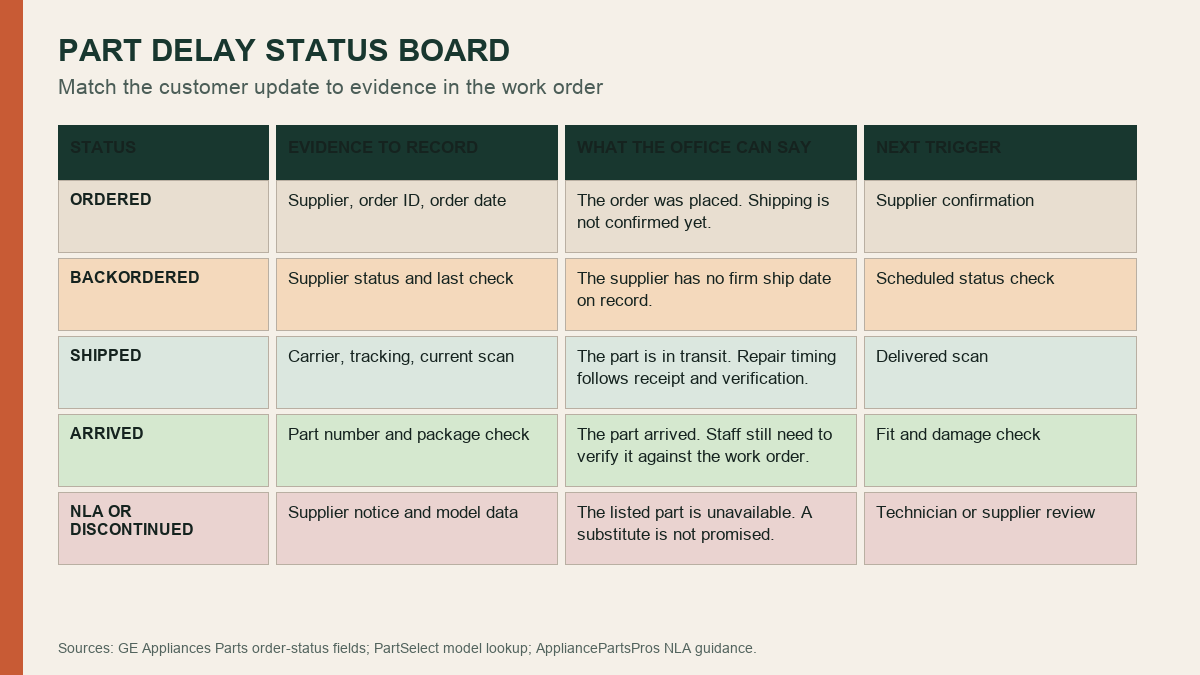
Use these distinctions in the work order:
Ordered means the purchase was placed. Shipping may still be unconfirmed. Give the customer the order date and say which confirmation the office is waiting for.
Backordered means the supplier reports that state. If the supplier has no firm ship date, say so plainly. A date marked “estimated” stays an estimate.
Shipped means the carrier has the parcel in its network or the supplier has recorded shipment. It does not mean the part is on your shelf. Tell the customer the current scan and explain that scheduling follows receipt and verification.
Arrived means the package reached the shop. Someone still needs to compare the label with the work order and look for visible damage or a picking error. The technician may need to confirm fit before the return visit is booked.
No longer available or discontinued means the listed source cannot supply that part. It does not prove that every repair path is closed. AppliancePartsPros’ guidance on unavailable parts describes model-specific alternate research. Treat a possible substitute as a lead for supplier or technician confirmation, never as an automatic match.
This distinction also protects a repair-or-replace conversation. The office can explain the sourcing state while leaving the technical decision to the person reviewing the machine, part data, and available alternatives. For a separate intake framework, see how to set the next step on appliance repair-or-replace calls.
An unchanged status still deserves a real callback
The hardest update is often the honest one: the supplier record did not change.
Silence makes the customer chase the shop. False precision causes a different problem. “It should be here Friday” sounds firm even when the supplier has posted no shipment. The better callback reports the check itself.
A useful sample sounds like this:
“I checked supplier order 8472 this morning. It is still listed as backordered, and the supplier has not posted a ship date. I added a new status check for Thursday afternoon. We will contact you then, even if the listing has not changed.”
The order number in that sentence is a fictional example. The structure is the useful part. It tells the customer what was checked, what the record says, what the office still cannot confirm, and when the next contact will happen.
Choose the next check from your shop policy, supplier practice, appliance condition, and any warranty process. Do not make every delayed part “urgent” because the caller is frustrated. Urgency should come from the appliance condition and the technician’s safety guidance, not from a shipping guess.
Protect the return visit from a premature booking
A tracking email can trigger a rush to reserve the technician. Resist it.
Carrier delivery estimates move. Packages get misrouted. A carton can arrive with the wrong component inside. Even a correctly labeled part may require a technician’s model-specific review. Scheduling the return visit before your verification step shifts the uncertainty into the customer’s calendar.
Set a clear internal release point for booking. For one shop, that may be “received, label matched, no visible shipping damage, technician approval recorded.” A manufacturer-authorized repair or warranty job may need other checks. Write your own release rule and train the office to use it.
The same care applies when collecting money or explaining prior charges. A diagnostic visit covered the technician’s assessment under the company’s stated policy. A parts delay does not rewrite that policy on the fly. If staff need a cleaner explanation for the first visit, use the separate guide to explaining appliance repair diagnostic fees.
Give one person ownership of the next action
A work order with “check next week” has no owner. Name a person or queue and a due date. The task should survive vacations, sick days, and a busy dispatch board.
The owner does not need to be the same employee who spoke with the customer last time. Shared records make handoffs possible. What matters is that the next person can see the source checked, its timestamp, the current state, and the exact unresolved question.
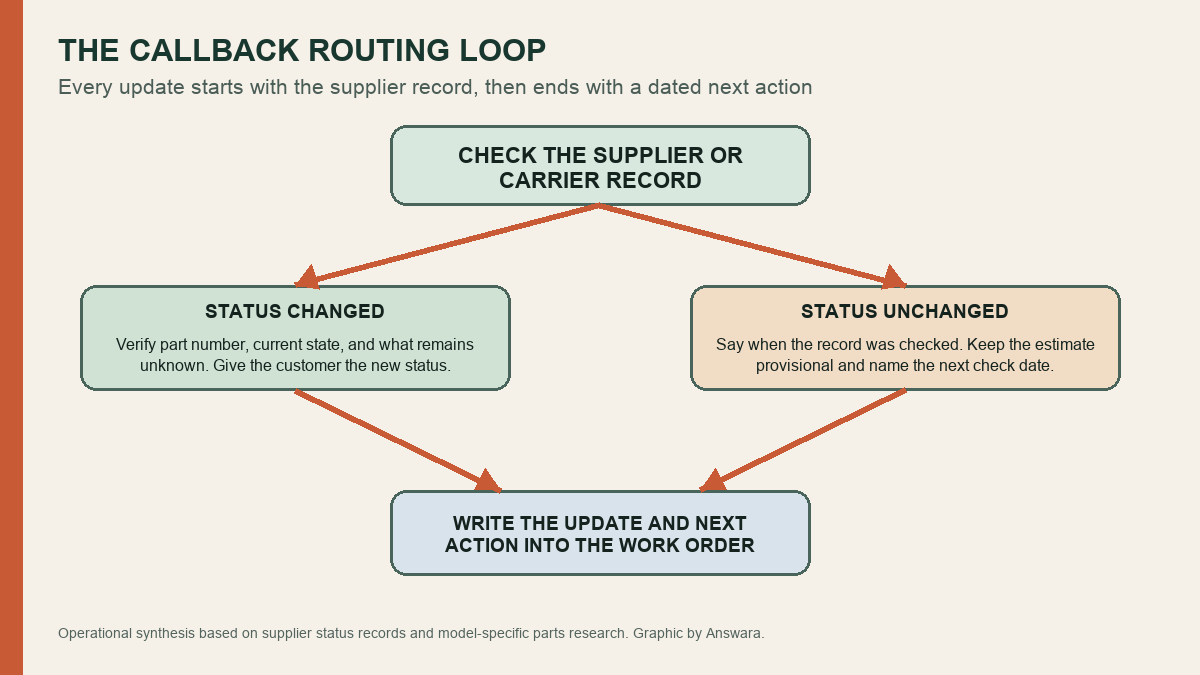
After each contact attempt, record whether the customer answered, received a voicemail, requested a different channel, or asked a question that needs technician review. Keep the note factual. “Customer angry” tells the next employee very little. “Customer asked whether the appliance can remain unplugged until the part arrives; technician response required” gives the team a task it can complete.
An AI receptionist can capture an after-hours status request and attach the customer’s question to the correct job. It should not invent a part status or delivery date. The supplier record and your designated staff still control the answer.
Write the callback policy on one page
The strongest policy is short enough to sit beside the parts screen. Define your approved status names, the evidence required for each, the language staff may use, the point at which a return visit can be scheduled, and who owns overdue checks.
Run a quick test with an old work order. Hand it to someone who did not manage the repair and ask them to prepare the next customer update. If they must call the technician to learn the supplier, search email for the order number, or guess when the status was last checked, the record is missing a field.
Fix the field. The next Tuesday-morning callback should take one supplier check and one clear work-order note, while the technician keeps working across town.