A caller says the refrigerator is warm and reads a string of characters from a faded sticker: “Maybe that is an eight. Or a B.” The office types a best guess into the work order, then the technician arrives with the wrong product record.
There is a better intake method. Ask for a clear photograph of the entire rating plate, record the model and serial number in separate fields, and preserve every letter, digit, dash, dot, and suffix. If the caller cannot reach the tag safely, stop the search and flag the missing identity for the technician. Do not turn a booking call into an appliance-moving job.
That simple policy gives an appliance repair office a usable record while keeping expectations honest. The model number can narrow the documentation and parts research. The serial number can distinguish an individual unit or production range. Neither one diagnoses the failure by itself.
Ask for a photo before asking for a recital
Long alphanumeric codes are poor phone material. “S” sounds like “F.” Zero becomes the letter O. A slash, dash, or two-letter suffix disappears when somebody reads quickly. The caller may also choose the largest number on the sticker even when the label identifies it as a serial number, stock number, or electrical rating.
A photo preserves the labels and punctuation. Ask the caller to include the entire plate in the frame, then take a closer image if the print remains small. Keep the wider image with the work order. It provides context when the close-up cuts off a field name.
The front-desk record should contain four things:
- appliance type and brand as the caller understands them
- a photo of the full tag, plus a close-up when needed
- model and serial transcribed into separate fields
- the source and confidence, such as “photo verified,” “read by caller,” or “copied from prior invoice”
Read back any ambiguous section using plain comparisons: “I have B as in Boston, then zero, then eight.” Never silently clean up a code because the format looks odd. PartSelect’s model-number guide notes that appliance model numbers may combine letters, numbers, and punctuation. A suffix that looks incidental may belong to the full model identity.
Separate the model, serial, and everything else
A rating plate can carry several legitimate codes. Office staff need the field label, not the most prominent number.
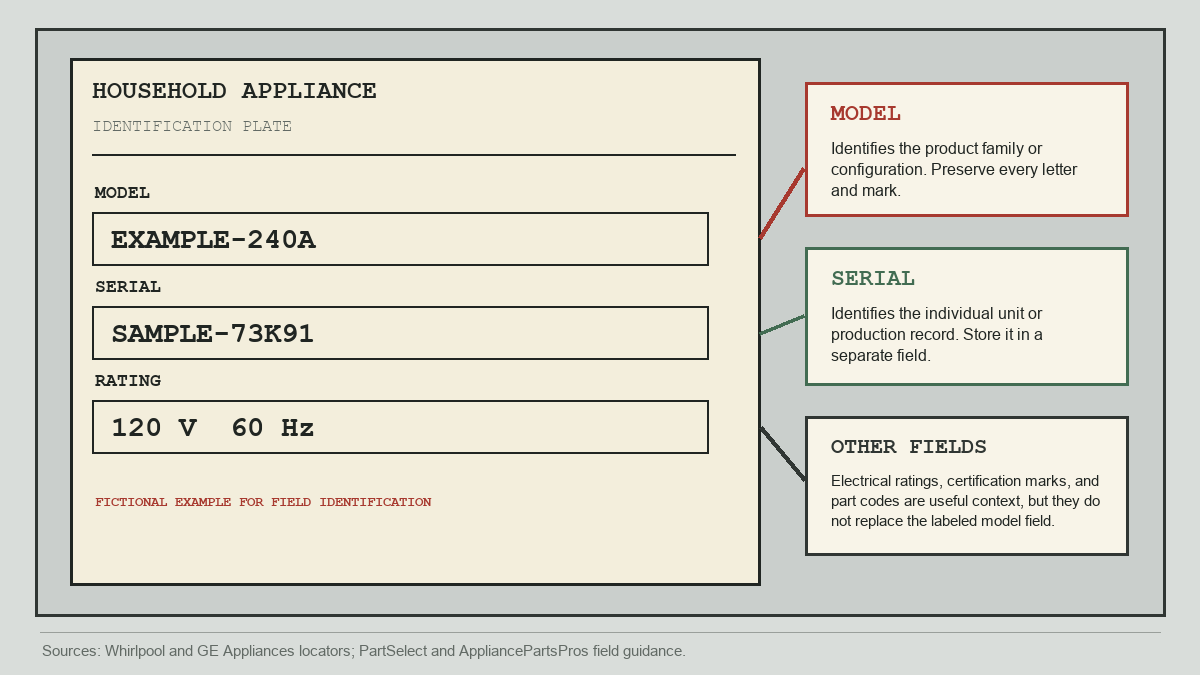
The model field identifies a product family or configuration. It is the place to start when looking for the correct manual, service information, or model-specific parts catalog. The serial field identifies the individual unit or a production record within that model family. Manufacturers do not all encode serial numbers the same way, so the office should store the value rather than trying to decode it during intake.
Other text may still help. Voltage, fuel type, certification marks, revision codes, and manufacturing details can give the technician context. They should not be pasted into the model field. AppliancePartsPros specifically distinguishes the model number from revision, serial, and part numbers and recommends using documentation for the exact model.
Exact identity also matters beyond parts research. The U.S. Consumer Product Safety Commission sometimes defines an appliance recall through a combination of model numbers and serial ranges. One GE refrigerator recall, for example, lists affected models and qualifying serial prefixes. That does not make the front desk a recall authority. It explains why a partial code is a poor substitute for the original label.
Guide the search by appliance type
“Look on the back” is bad advice for a refrigerator wedged into cabinetry. It is also often unnecessary. Manufacturers publish tag locators organized by appliance category. GE Appliances provides a model and serial locator that starts with the product type, while Whirlpool’s locator gives guidance across its major appliances.
Start with what is visible and easy to reach. A caller can usually inspect door frames, the inside wall of a refrigerator compartment, the rim around an opening, or the area behind an ordinary drawer that the owner’s guide says is removable. Exact positions vary by brand and model. Use the manufacturer’s current locator when the first visible area comes up empty.
The office should ask one orienting question before giving directions: “Is this a refrigerator, range, dishwasher, wall oven, washer, or dryer?” Then ask for the brand. This keeps the caller out of irrelevant places and lets the staff member open the right official guide.
Avoid broad claims such as “all dishwashers have the tag on the left side of the door.” A location that works for one product line can fail for another. Give one manufacturer-backed location at a time, then request the photo.
Put a firm safety stop into the script
The search ends when ordinary access ends. A caller should not pull a refrigerator away from a wall, tip a range, climb onto a counter, remove an appliance panel, reach near exposed wiring, or handle a hot surface to satisfy the office. Nor should a tenant disassemble equipment owned by a landlord.
Use a direct line: “If the label is not visible without moving the appliance or removing anything, please stop. We will mark it for the technician.”
This rule protects the caller and improves the work order. “Tag inaccessible without moving unit” is meaningful evidence. It tells dispatch why the model field is blank and warns the technician that site access may need attention. A guessed number hides both facts.
If the appliance is leaking, smoking, sparking, giving off a gas odor, or presenting another immediate hazard, identity intake is secondary. Follow the company’s emergency and safety policy. Office staff should not coach a repair or diagnose the condition over the phone.
Route incomplete identity records deliberately
A missing photo does not always require the same response. A customer who cropped off the serial field needs a different next step than a customer whose built-in oven tag cannot be reached without disassembly.
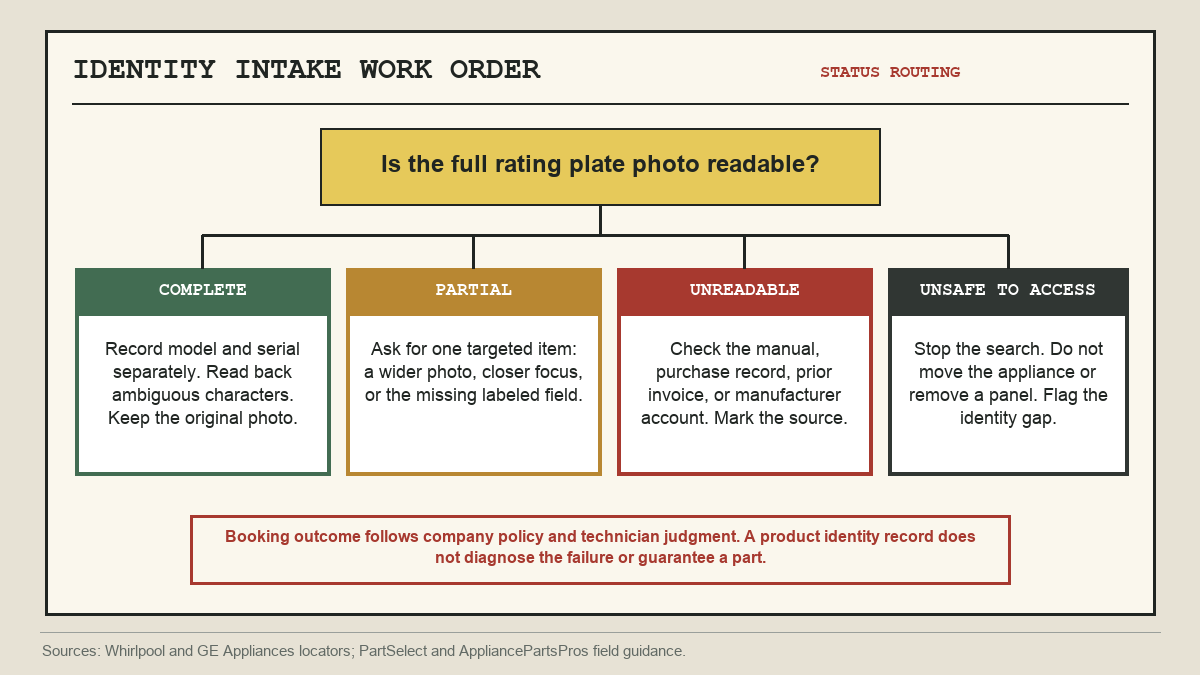
When the photo is complete, transcribe and verify it. When one field is cut off, ask for that field instead of restarting the whole interview. A blurred image may need better light or a steadier close-up. If the tag cannot be photographed, check records the customer can access safely: the owner’s manual, purchase receipt, manufacturer account, warranty registration, or a prior service invoice.
Label the source. “Model from receipt, serial unavailable” is much better than a populated field that looks verified but is not.
Whether the office can book without exact identity depends on the company’s service model. A general diagnostic visit may proceed with the gap flagged. A job that depends on pre-researched parts may need technician review first. The appointment note should say what is known, what was attempted, and what remains unverified.
This distinction also helps with diagnostic-fee conversations. A precise product record can support preparation, but it does not prove which component failed or whether the repair belongs within a quoted scope. Keep identity, diagnosis, and price as separate decisions.
Store the tag where the next person will see it
The photo loses its value when it sits in a text-message thread that the technician cannot access. Attach it to the customer, appliance, or work-order record used by dispatch. Use dedicated model and serial fields where the system provides them. Put the confidence note beside those fields.
For a repeat customer, do not assume the appliance on the new call is the one already saved. Ask, “Is this the same washer we serviced last time?” A kitchen may have two ovens, a landlord may manage several identical refrigerators, and an appliance can be replaced between visits.
A modest automation layer can help here. An AI receptionist can request the tag photo after a call and write the caller’s description into the intake record, but the workflow still needs a human-readable image, separate identity fields, and a safety stop. The useful part is consistency.
When a repair-versus-replace question follows, pass the verified identity forward with the symptom and service history. The next conversation can then follow the office’s repair-or-replace intake process without asking the customer to hunt for the same sticker again.
The best work-order note is pleasantly boring: full tag photo attached, model verified, serial verified, source recorded. When one piece is missing, say exactly which one and why.