A homeowner calls because she wants to run the sprinklers from her phone. The existing controller is in a detached garage. She has twelve stations, a well pump, an old rain sensor, weak Wi-Fi at the wall, and two zones that already fail to start. “Can you install a smart one?” sounds like a product question. It is really a site and system question.
Before recommending equipment, capture the current controller model, active station count, spare stations, sensors, pump or master valve, known faults, power and enclosure, Wi-Fi at the controller, landscape zones, desired controls, likely account owner, and local watering rules. Book a field assessment when any of those details remain uncertain. A useful consultation separates the upgrade from repairs the property already needs.
Start with the result the caller expects
Ask what prompted the call. “Smart controller” can mean remote start and stop, weather-adjusted scheduling, soil-moisture input, leak or flow alerts, easier seasonal changes, shared access for a landscaper, or a way to check the system while the owner travels. Write down the desired outcome before discussing brands.
That distinction matters because app access and water-responsive scheduling are separate capabilities. The EPA WaterSense controller guide describes two labeled categories. Weather-based controllers use local weather and landscape conditions to tailor schedules. Soil moisture-based controllers use readings from the soil to prevent irrigation when water is not needed. Some products can use both types of information, but a label applies only when the relevant product configuration meets the program criteria.
Ask whether the customer needs a WaterSense-labeled product for a utility program or rebate. Record the utility name, program link, application deadline, required model or product listing, installer rules, and whether approval must happen before purchase. The office should verify the current program. A caller’s memory of last year’s rebate is not enough.
Avoid promising water savings on the phone. EPA publishes national estimates for properly installed and operated labeled controllers, but one property’s result depends on its prior schedule, landscape, weather, equipment condition, and maintenance. The estimate should cover the work you can inspect and deliver.
Inventory the current control system
Get a clear photograph of the controller with its door closed, then the model label and station terminals only if the customer can photograph them without entering a household-voltage compartment. Ask for the brand, exact model, approximate age, indoor or outdoor location, station capacity, number of active stations, and any expansion modules.
Count what the controller operates. The station list may include lawn spray zones, rotors, drip beds, a vegetable garden, foundation watering, a pump-start relay, or other site-specific controls. “Eight zones” may mean eight buttons on the old controller, while only six field circuits are connected. Field verification settles the count.
Capture every attached input and output the caller knows about:
- rain, freeze, soil-moisture, or flow sensors
- master valve, pump-start relay, or booster pump
- shared common wiring, two-wire or decoder equipment, and any unusual control arrangement
- drip zones, pressure-regulated zones, and high-flow rotor zones
- expansion modules and spare station capacity
- separate front-yard, backyard, or tenant systems
- recent controller, valve, wiring, pump, or landscape work
Do not turn this inventory into a compatibility promise. A model number and a photograph can narrow the options. The technician still confirms wiring, load, accessory support, enclosure requirements, and field condition.
Some controllers accept a manufacturer-specific communications module, while others require full replacement. Rain Bird, for example, documents an ESP-Me family that can take a compatible Wi-Fi module and rain sensor. That example proves why the exact model matters. It does not make every ESP-branded cabinet, third-party module, or existing sensor interchangeable.
Check the wall, power, and network
The installation location can rule out an otherwise appealing controller. Ask whether the cabinet is indoors, outdoors, exposed to irrigation spray, inside a metal enclosure, mounted in direct sun, or placed where a phone barely receives Wi-Fi. Record the power source and whether the customer has noticed tripped outlets, a blank display, corrosion, insects, water entry, heat damage, or a loose transformer.
Keep the safety boundary firm. The caller can report what is visible from normal operation. Do not coach someone through line-voltage wiring, cabinet disassembly, or testing around water. A licensed trade may be needed if the installation requires new line-voltage power or changes outside the irrigation contractor’s permitted scope.
Ask the caller to check ordinary phone Wi-Fi at the controller location with the enclosure closed. Record the network name only if company policy needs it for the appointment. Never collect the Wi-Fi password in an open call note. If signal is weak, the scope may include moving network equipment, adding an approved network solution, choosing a controller with a different connection method, or keeping local control. The irrigation estimator should not promise which fix will work before testing the location.
The Irrigation Association’s smart-water FAQ notes that features and station counts affect controller cost and that some weather-based products use a paid weather-data service. Ask who will pay for any subscription, what happens if it lapses, which functions remain available locally, and whether the customer accepts cloud-dependent operation.
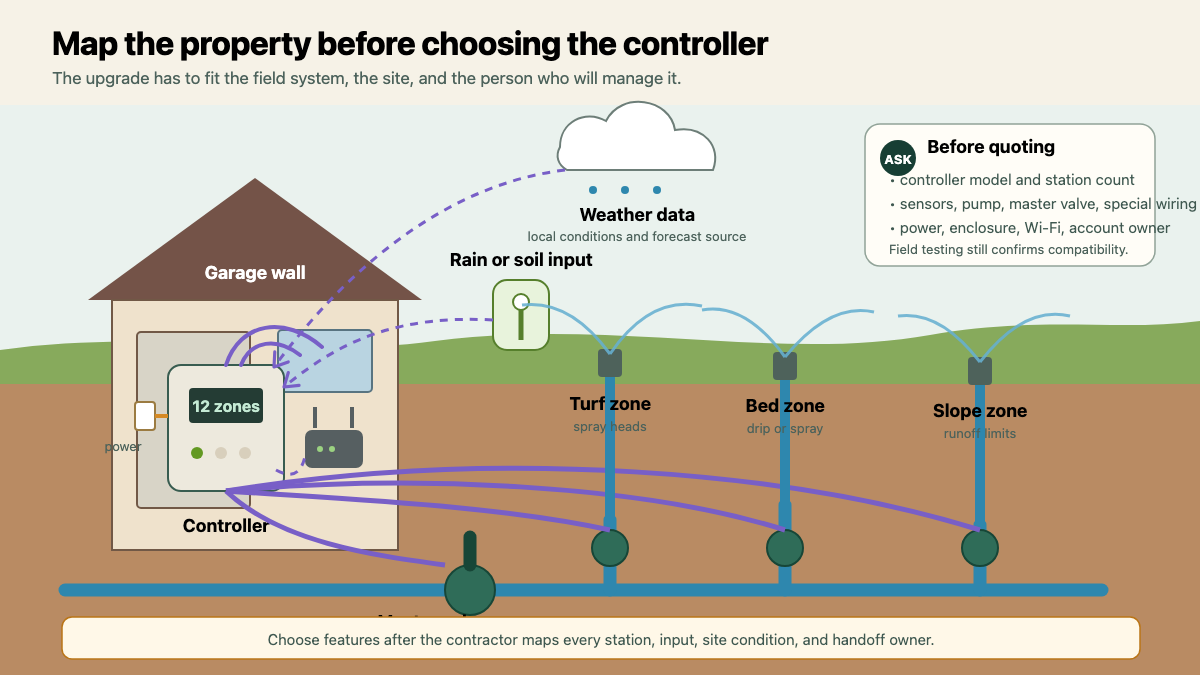
Map the landscape the controller will manage
A smart schedule needs more than station numbers. Ask what each station serves and how the zones differ. Useful fields include plant type, turf or bed, sun exposure, soil behavior, slope, spray or rotor heads, drip tubing, known runoff, and the days or hours when local rules allow irrigation.
The office does not need to calculate a final schedule on the call. It needs enough information to plan the site visit. “Zone 7, west slope, full sun, rotors, runoff starts near the sidewalk” prepares the technician. “Backyard” does not.
Ask about the water source. Municipal water, reclaimed water, a well, a cistern, and a pump-fed system can create different control and labeling needs. Record any watering restrictions, pump protection concerns, shared wells, HOA rules, or reclaimed-water signage as reported. The contractor verifies the actual equipment and requirements onsite.
If the customer wants soil-moisture control, note the areas they care about and where sensors might need to communicate. If they want weather-based scheduling, confirm the service address and whether unusual site conditions make nearby weather data a poor stand-in. Tall walls, coastal exposure, deep shade, reflected heat, and steep slopes belong in the assessment even when the controller uses weather data.
Separate existing faults from the upgrade
Ask the caller to describe the current system on a normal manual run. Does every station start? Do valves shut off? Are heads broken, tilted, buried, misting, or blocked? Does water pool after a zone stops? Are any zones weak, mislabeled, or missing from the controller? Record the observations. Do not diagnose the part.
A new controller cannot repair a cut station wire, clogged valve, broken lateral, poor pressure, failed pump, or mismatched nozzle layout. Those conditions may need diagnosis before commissioning. Quote them separately or state that repair scope follows testing.
The irrigation repair intake guide gives the office a safe zone-by-zone test and work-order format. Use that workflow when the caller reports active leaks, persistent flow, dead stations, or electrical concerns. A controller consultation should not bury an urgent repair inside an equipment estimate.
Preserve the old schedule and station names before removal. Photographs and an exported configuration can help, but they are references rather than proof that the prior settings were correct. The commissioning visit should test every station, correct labels, and build the new schedule from verified site conditions.
Define commissioning and account ownership
Ask who will own the product account. The property owner, property manager, tenant, irrigation contractor, and landscape maintenance company may all want access. One person should control the primary email address, phone number, recovery method, payment details, and transfer process.
Put account handling in the proposal. State who creates the account, who receives invitations, who keeps recovery codes, whether contractor access continues after commissioning, and how ownership transfers when a property sells or a manager changes. Do not place passwords, one-time codes, or recovery tokens in a general work order.
The handoff should include a tested station list, zone names, controller and accessory models, sensor status, account owner, approved secondary users, baseline schedule, watering restrictions entered, notifications configured, local manual-control instructions, and the support boundary. Show the owner how to pause watering and run one station without teaching them to override safety controls or local rules.
Proper programming and maintenance still matter after installation. EPA makes that qualification explicit in its WaterSense guidance. Set a follow-up plan for seasonal review, landscape changes, sensor checks, firmware or service notices, and field repairs.
Close the call with a concise appointment note: “Existing controller reported as twelve-station unit in detached garage. Ten stations active, one rain sensor, well pump with relay, and weak Wi-Fi at wall. Zones 4 and 9 do not start and need diagnosis outside the upgrade quote. Owner wants remote access and weather-based scheduling and will own the account. Utility rebate rules must be checked before equipment is ordered. Technician to verify station wiring, pump control, enclosure, signal, sensor compatibility, field operation, and landscape inputs.”
That note gives the estimator a real assignment. The product recommendation comes after the property is mapped, the faults are separated, and the future account owner is known.