“We need the door code changed today.” That sentence leaves most of the job undefined. Which door? Which lock? Does the caller want one former employee removed, a temporary cleaner added, every user code replaced, or administrative access recovered after a property handoff?
A useful intake separates the requested access change from the secret numbers used to perform it. Record the lock model, affected doors, credential roles, authorized decision-maker, owner-app access, physical-key status, prior attempts, deadline, and test plan. Keep actual user codes, master PINs, programming codes, passwords, QR labels, and recovery tokens out of ordinary job notes.
Start with the event that triggered the call
Ask what changed. A tenant moved out. A contractor finished. An employee was terminated. A houseguest needs access for one weekend. A property manager inherited a keypad with no current administrator. Each event creates a different task and a different urgency.
Then name the action in plain language. Is the caller asking to add one person, delete one person, rotate every active code, recover administration, review who still has access, or replace hardware that can no longer be managed? “Change the code” can mean any of those.
Capture the affected opening too. Small businesses often have a front entry, stockroom, office, alley gate, and shared building door under different control. A residential caller may have a keypad on the front door and another on a detached garage. List each opening separately. Do not assume one programming session updates all of them.
For an urgent removal, record the exact deadline and who can authorize service. Avoid promising that a phone call has already disabled access. The change is complete only after the correct product accepts it and the result is tested.
Identify the lock before discussing steps
Ask for the brand and exact model from the interior housing, manual, purchase record, or owner app. A photo of the full interior and exterior hardware can help if the caller can send one without exposing a programming label, QR code, key, or private account screen.
Button sequences vary. So do code lengths, user limits, confirmation lights, app workflows, programming buttons, and reset effects. Schlage publishes product-specific programming guides and distinguishes programming codes from everyday user codes on supported keypad products. Kwikset uses model-specific combinations of a physical program control, Mastercode, keypad, and app. Yale’s connected keypads can manage guest entry through an owner app.
Reception should not read a generic sequence from a search result and hope it matches the lock. The correct model narrows the approved manual, required administrator, likely visit scope, and information the technician needs.
Ask whether the keypad wakes, whether an authorized current code still operates the lock, and whether the door can be opened with a mechanical key. These observations establish access. They do not require the caller to disclose any credential.
Separate four kinds of access
Callers often use “the code” for several different things. Treat each as its own role:
- A user code unlocks a door for a resident, employee, cleaner, guest, or vendor.
- A programming code or master credential authorizes changes on supported models.
- An owner app account may create, schedule, or remove connected access.
- A mechanical key may remain a separate way to enter and may require its own rekey decision.
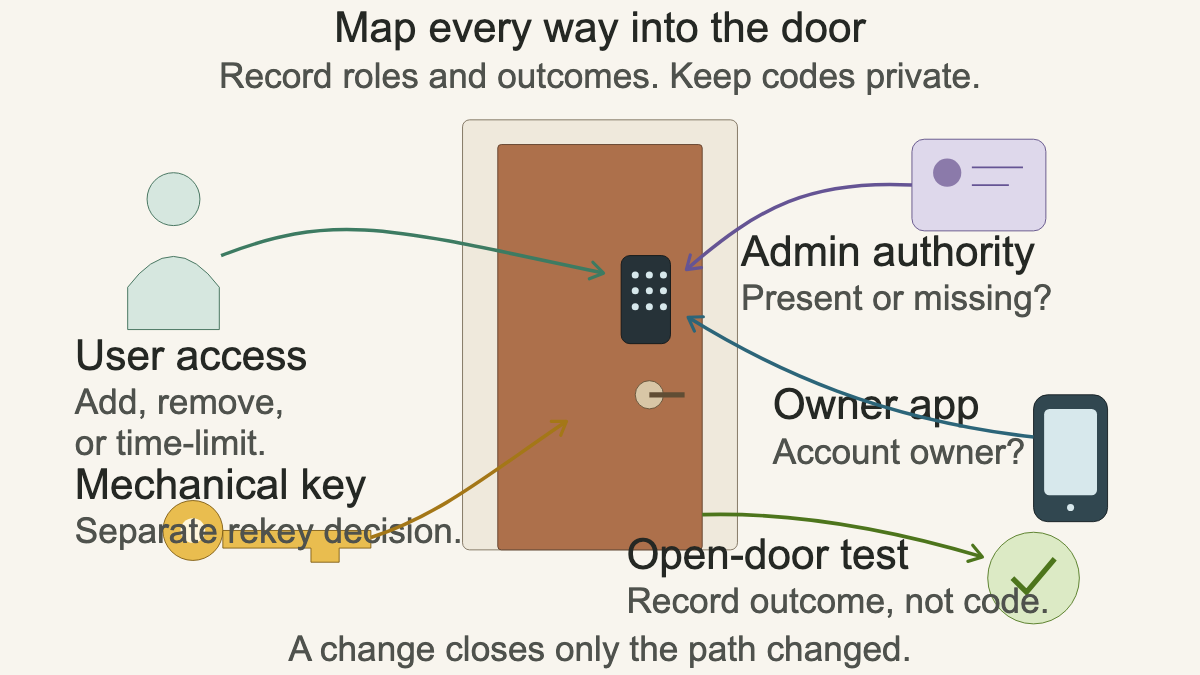
Ask whether the caller has the relevant administrative authority, not what the credential is. A clean note says, “Owner has the current programming credential and will be present.” Another says, “Manager can unlock with a user code but does not control the owner app.” That difference can decide whether the visit is a routine change or an account-recovery and authorization problem.
The physical key deserves its own question. Deleting a keypad code does not establish whether someone still holds a working key. If the triggering event involves a former tenant or employee, ask whether key control must be reviewed. Do not promise that an electronic change replaces a cylinder rekey.
Verify authority without collecting secrets
Record the caller’s relationship to the property, the owner or manager, the person meeting the technician, and the person allowed to approve additional work. Follow the locksmith’s identification and authorization policy. For a rental, capture the tenant, unit, property manager, billing contact, and any owner restrictions on resets or replacement.
For a business, ask who administers access and who owns the connected account. A departing employee may have known a user code, held an app invitation, carried a physical key, or served as the only administrator. Those are separate exposures. The office can list them without storing a code or password.
Never ask a caller to text a programming sticker, master PIN, app password, recovery token, or clear image of a key. Secret values can be entered by the authorized person at the lock or handled under the company’s secure procedure. Ordinary dispatch notes should contain role and status only.
If the caller cannot establish authority, schedule according to the shop’s verification policy or pause the work. A working user code proves that someone can operate the door. It does not, by itself, prove that the person may alter everyone else’s access.
Treat factory reset as a scoped change
“Just reset it” can remove more than the caller expects. Yale states that resetting its Smart Keypad deletes entry codes affiliated with that keypad. Other products may restore factory credentials, remove users, break app links, clear schedules, or require setup again. The exact effects belong to the manual for that model.
Before a reset is considered, ask who controls the account, how many people rely on the opening, whether temporary or scheduled access exists, whether the lock is tied to an alarm or automation, and whether another administrator is available. Record previous reset attempts and what changed afterward.
A reset is especially risky at an occupied rental, medical office, shop with shift workers, or shared building entrance. The caller may be focused on one former user while several current users still need entry. The technician needs a restoration plan, not a surprise list of people waiting outside.
Do not promise that a reset will recover a lost administrator or fix a keypad fault. It may create a clean configuration on a supported product, but account ownership, hardware condition, batteries, door alignment, and network status can still matter. If the lock also has power symptoms, use the smart-lock battery failure intake to keep that work separate.
Build a code-change roster without code values
For more than one user, create a role roster. Use labels such as owner, office manager, weekday cleaner, weekend technician, or temporary guest. Record whether each role should remain, be removed, become time-limited, or receive a new credential. The authorized administrator chooses the actual values during service.
For a small business, a useful roster might read:
- front door: remove former manager, retain owner and opening staff, add cleaning vendor for approved hours
- stockroom: retain owner and inventory lead only
- alley gate: rotate shared access and confirm the closing supervisor
- mechanical keys: owner will decide whether cylinder rekeying is included
This gives the technician a work order that can be checked. It also prevents a common handoff failure where reception writes “change all codes” and nobody knows which doors, users, schedules, or keys count as all.
Define the visit and completion test
Explain the service or diagnostic charge and what it covers under the shop’s policy. If the model, administrative credential, or account owner is unknown, describe the visit as identification and access-administration work. Do not guarantee a code recovery, reset, or fixed price before the technician verifies the product and authority.
Ask who will be present to enter credentials and test access. Manufacturer workflows differ, but Kwikset support for named keypad models instructs users to keep the door open during programming and test the result before relying on it. The practical rule is sound: follow the exact manual and avoid creating a lockout during verification.
The completion record should state which role was added or removed, which opening was tested, whether the new authorized credential worked with the door open, whether the retired credential was confirmed inactive when policy permits, and whether the mechanical key or app access needs separate work. Do not write the new or old code.
Read the ticket back: “Owner requests removal of a former cleaner from the front-entry keypad today. Lock is a Yale connected keypad paired with the owner’s app. Owner controls the account and will meet the technician. Two current household users must remain active. The physical key still works and no rekey is requested. No codes, passwords, or recovery labels were collected. Completion requires an open-door test and confirmation that the former role is inactive.”
An AI receptionist can collect the same bounded fields after hours and route the call under the locksmith’s authorization rules. The technician should arrive knowing the door, product, requested access change, administrator, and test plan, while every secret stays with the authorized person.