“The alarm went off for no reason” sounds like a routine service complaint. Then the call handler learns that the homeowner is outside, the siren is still sounding, nobody has checked the back door, and the monitoring center has already called.
Start with safety. If smoke, carbon monoxide, panic, duress, or a possible intrusion has not been resolved, follow the company’s emergency procedure. Do not turn the call into troubleshooting. Once the event is safely over, capture the exact time, zone or device, arming state, people present, monitoring outcome, and any recent change near the sensor. That record determines whether the next step is user training, a monitoring-account review, or field service.
A home security false alarm is a conclusion reached after the event. The office needs the event itself.
Treat the first minute as a safety screen
Ask one direct question: “Is anyone in danger, and has the property been checked under the monitoring center’s or emergency responder’s instructions?” The wording should match the installer’s approved script. A receptionist should never tell a caller that an alarm is safe to ignore.
Life-safety devices stay on their own route. First Alert’s nuisance-alarm guidance tells occupants who are unsure whether a smoke or carbon monoxide signal indicates an emergency to evacuate and call emergency services. Panic and duress signals also belong inside the company’s emergency process. The same caution applies when a homeowner cannot account for an open door, broken window, unfamiliar person, or other sign of entry.
When danger has been resolved, establish who resolved it. Record whether the monitoring center canceled the activation, an authorized user verified an accidental trip, police or fire personnel responded, and the system returned to a normal state. Keep judgment about blame out of the note.
Local permit, verification, and cancellation rules differ. The office should use the procedure for the customer’s monitoring account and service address. A generic script copied from another city can create a bad handoff.
Capture the event, not the caller’s conclusion
Ask the caller to read the event exactly as it appears in the app, keypad history, email, text, or monitoring notice. “Kitchen motion at 2:14 a.m.” is useful. “The system is acting up again” is not.
The event timestamp anchors everything else. It lets the office compare the panel record with monitoring calls, household activity, weather, power changes, deliveries, contractors, cleaners, guests, and pet movement. Then get the zone or device label. If the app says “Zone 06,” write that. If it says “Back slider,” preserve that wording too. A technician can later confirm whether the label matches the physical device.
Record the system state at activation. Was it armed away, armed stay, in an entry delay, recently disarmed, or in a test mode? Ask who armed it and how: wall keypad, key fob, app, schedule, or automation. If somebody entered a code, note whether it was accepted. Never write the code itself in an ordinary job note.
The U.S. Department of Justice guide to false burglar alarms identifies user errors, faulty or unsuitable equipment, and poor installation as major cause families. Its examples include incorrect keypad codes, an open door or window during arming, and motion detection installed in an unsuitable place. Those examples support good questions. They do not prove the cause of this caller’s event.
Match the zone to the room and conditions
A zone label needs physical context. A front-door contact can be affected by the door, frame, contact alignment, magnet, wiring or battery, and the way people enter. A living-room motion zone sits inside a room with pets, curtains, heating vents, decorations, sunlight, furniture, and moving objects. The intake note should connect the panel event to that scene.
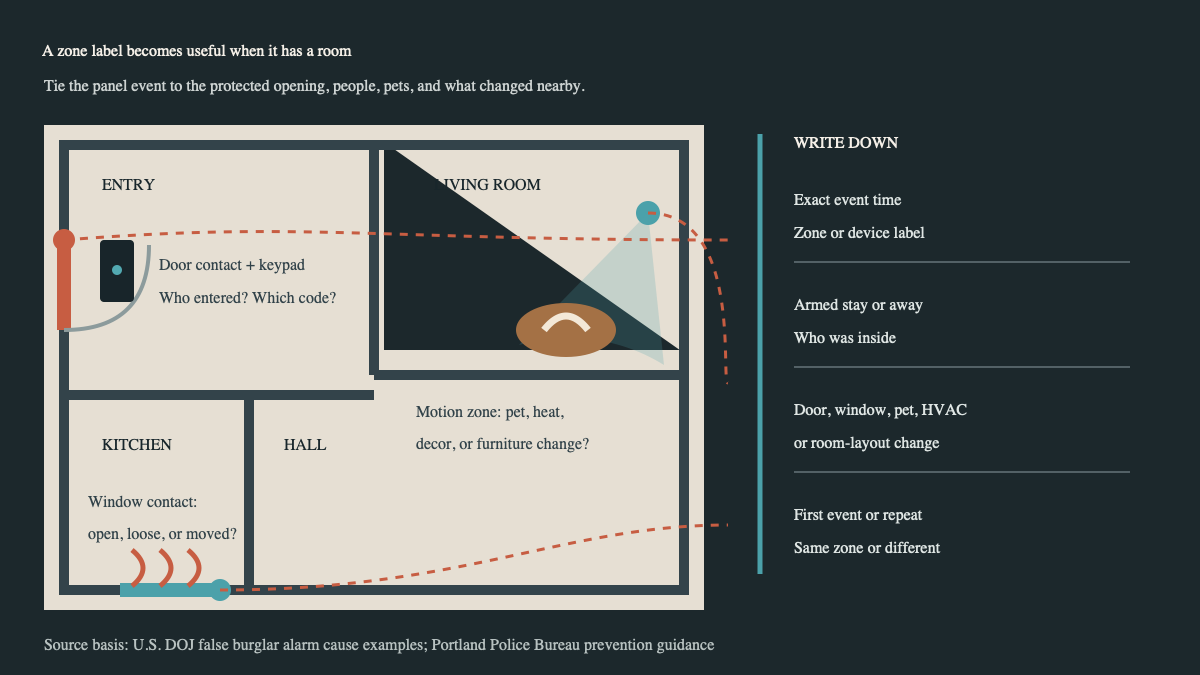
Ask what changed before the activation. A cleaner may have received a new code. A contractor may have left a protected window unlatched. A dog’s bed may have moved into a motion detector’s view. Holiday decorations, a new fan, a loose curtain, stacked boxes, or furniture moved close to a sensor can matter. So can a door that has started rubbing after wet weather.
Do not coach the caller to move a detector, alter sensitivity, bypass a zone, open the panel, or disable protection unless that action sits inside the company’s approved procedure. The office is gathering evidence for the next step. Equipment settings and installation decisions belong with trained service staff.
A useful post-event record includes:
- exact activation time, event type, zone number, and zone label;
- armed state, arming method, and the last authorized person to use the system;
- people, pets, guests, vendors, and known movement at the property;
- doors or windows found open, loose, damaged, or hard to close;
- recent changes to furniture, curtains, HVAC, decorations, codes, schedules, or automations;
- monitoring calls, verification result, cancellation, and any responder outcome;
- earlier events on the same zone, plus previous service or battery work.
Read the note back. “At 7:42 p.m., armed away, the panel reported Back Slider. The monitoring center reached the owner and canceled the dispatch after an adult family member confirmed they entered through that door with a code that was rejected. This is the first event on that zone.” That sentence gives the service team somewhere to begin.
Preserve the monitoring trail
The panel event, monitoring record, and room evidence should describe one incident. If they do not, the mismatch is part of the job.
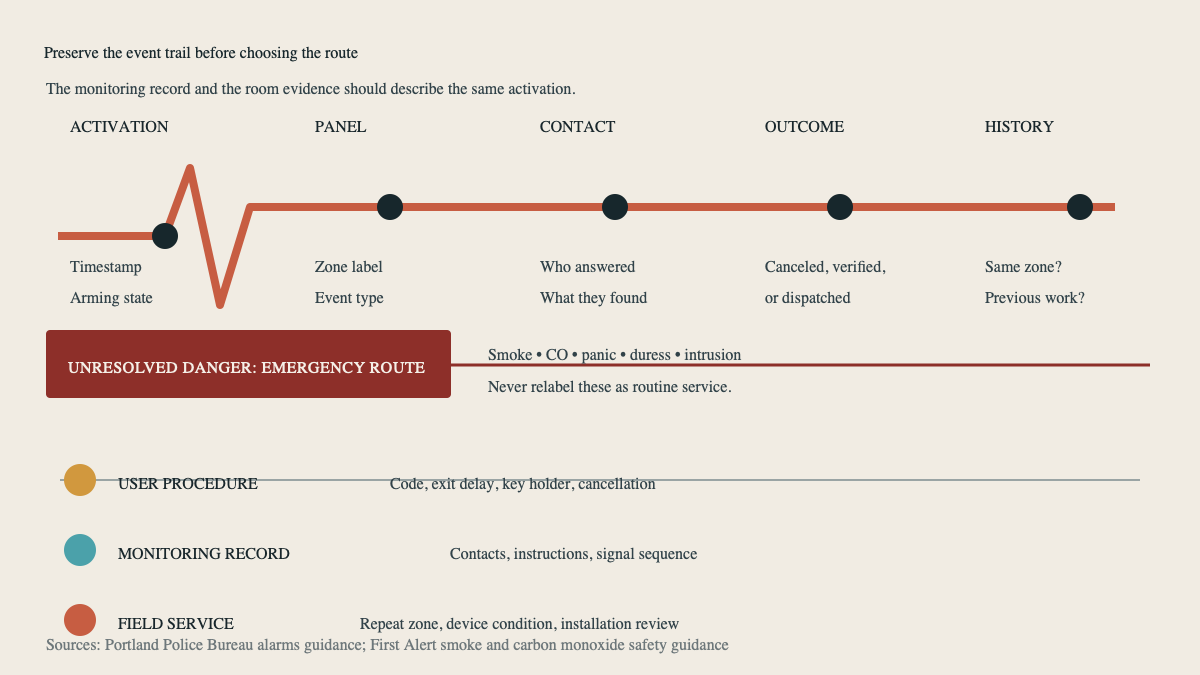
Confirm which contact the monitoring center called and whether the contact list is current. Ask whether the user knew the cancellation procedure and had the correct verbal password or account verification method. Keep passwords, passcodes, recovery codes, and one-time codes out of the service note.
Portland Police Bureau’s alarms guidance tells alarm users and key holders to know their arming codes, contact numbers, and cancellation procedures. It also recommends regular service. The exact rules are local, but the office lesson travels well: a technically sound alarm can still produce a preventable dispatch when contacts or user procedures are stale.
Monitoring questions need a different owner from field-device questions. A missing call, outdated key holder, wrong call order, or uncertain cancellation belongs with account operations. A repeat event from one physical zone belongs with a technician. When both appear, create two linked actions so one does not get buried inside the other.
Route the next step by evidence
A one-time wrong-code event with a known authorized user may need training and an account-record check. Repeated activations from the same door, window, glass-break device, or motion zone justify field service, especially when the physical scene and user procedure have not changed. Events across several unrelated zones may call for a broader panel, power, communication, installation, or account review. The technician decides the diagnosis after testing.
State the appointment honestly. “We’ll review the repeated hallway motion events and inspect the device and room conditions” is accurate. “The motion sensor is bad” gets ahead of the evidence.
Confirm whether the system is currently armed, partially bypassed, or unable to set. If protection has been reduced, follow the company’s escalation and customer-notification policy. Do not promise that a technician can restore every brand or preserve every existing configuration before the equipment and account are checked.
Broader design problems belong in a consultation. If the customer wants new coverage, pet-aware detection, camera verification, a redesigned entry delay, or a larger upgrade, use the home security installation consultation guide. Keep the current event record attached so the designer can see what prompted the request. The home security resources hub holds the related intake guides.
Close the loop with a named event and a named fix
After service, update the original event record. Name the confirmed cause when one was found, the work performed, devices tested, user instruction provided, monitoring records changed, and any follow-up date. Avoid notes such as “fixed alarm” or “checked system.” They leave the next call handler blind.
An AI receptionist can collect the timestamp, zone label, armed state, household activity, monitoring outcome, and repeat history after hours. Emergency decisions and technical diagnosis remain with the approved human and monitoring procedures.
A good closing note is plain. For example: “Back Slider event at 7:42 p.m. traced to a loose contact on the patio door. Contact secured and tested. Zone label confirmed. Owner reviewed entry and cancellation procedure.” If the same zone calls again, the office has a real history to open.
Sources
- U.S. Department of Justice: False Burglar Alarms, 2nd Edition
- Portland Police Bureau: Alarms Unit and False-Alarm Prevention
- ADT: False Alarm Prevention
- First Alert: Reducing Nuisance Smoke and Carbon Monoxide Alarms
- Alarm.org: Five Tips for False Dispatch Prevention