A shop owner calls for eight cameras and says, “I need the recordings kept for a month.” The office could write down the camera count and requested period. That would still leave the estimator without the information needed to design storage.
The useful first questions are operational. When does the owner usually discover a problem? Which views need continuous recording? Who should be able to watch footage or export a clip? Should recordings stay on the property, in a cloud service, or in both places? A security camera storage and retention request becomes quotable only after those answers are attached to the camera plan.
Begin with the evidence window
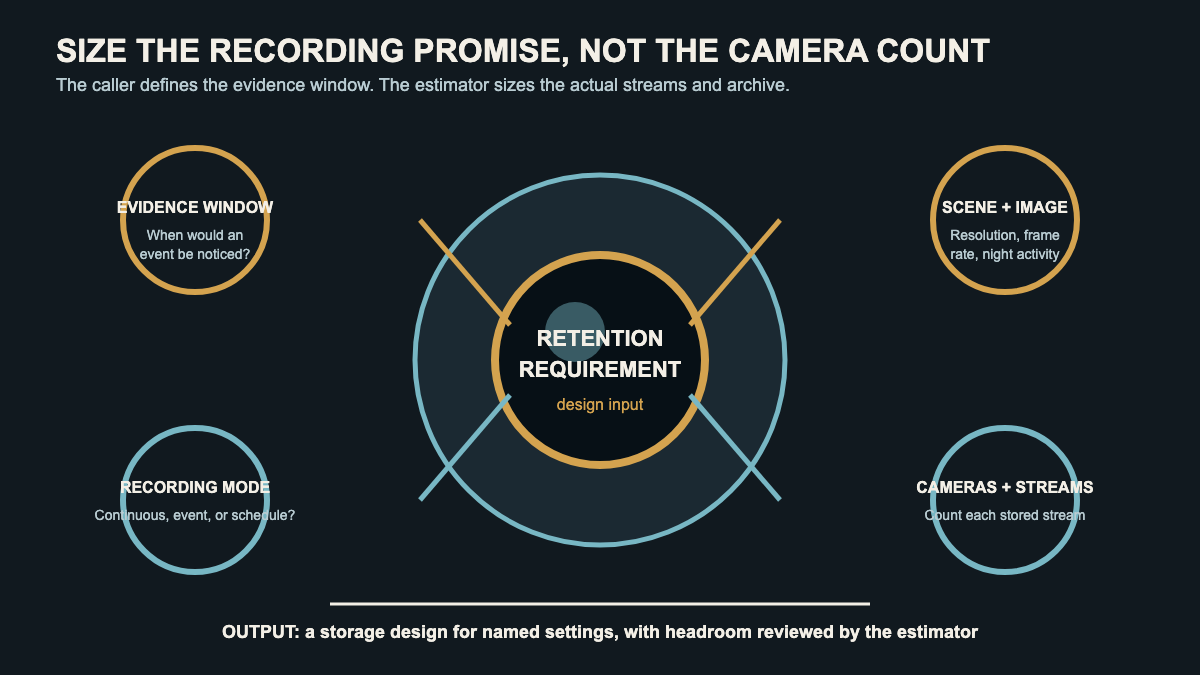
“Keep footage for a month” sounds precise, but the day count may have come from a guess, an insurance conversation, a company policy, or a product page. Ask what event the customer expects to investigate and how quickly anyone would notice it.
A homeowner checking a package alert that evening has a different evidence window from a warehouse manager who reconciles inventory after the weekend. A small retailer may need to review a disputed transaction after receiving a complaint. A property manager might hear about damage after a tenant moves out. The event and discovery delay tell the designer what the retention request is trying to protect.
The office should record the caller’s own requirement, then flag any legal, contractual, insurer, employer, or industry rule for independent verification. Recording and retention rules vary by location and setting. A receptionist should not turn a sales call into legal advice.
Ask one more question: what happens when someone identifies an incident? Routine retention answers how long ordinary recordings remain available. It does not explain who exports a clip, where that copy goes, or when it can be deleted.
Separate routine retention from incident preservation
Most recording archives operate as a rolling store. New footage eventually replaces older footage under the system’s configured policy. The exact behavior depends on the selected recorder, camera, service, settings, and available capacity.
An incident file has another job. Once the customer knows that a break-in, delivery dispute, fall, or property-damage event matters, somebody needs to preserve the relevant recording before routine overwrite reaches it. The sales record should identify the person authorized to export footage, the approved destination, the naming or case reference, and who decides when the saved copy can be removed.
That distinction catches a common expectation gap. “The system keeps video” does not guarantee that a particular clip will remain available after the normal retention period. It also does not guarantee that every user can export, share, or protect footage from deletion.
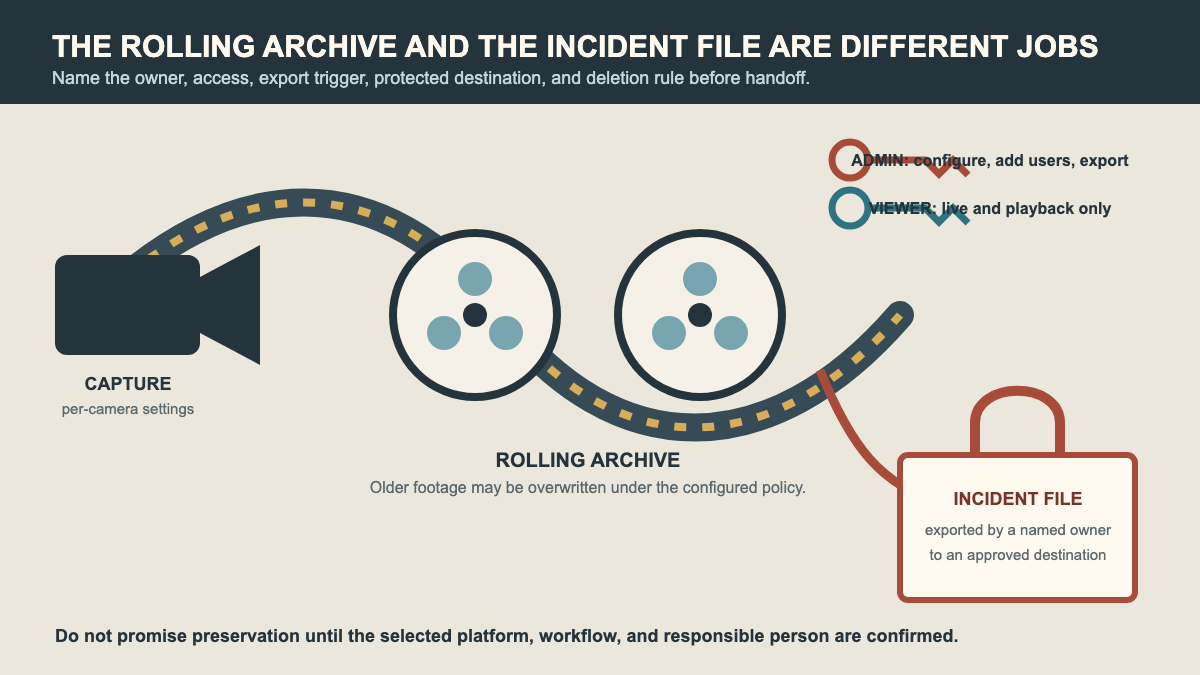
For a business system, ask who receives an incident request when the owner is away. If the answer is “everyone has the password,” the access plan needs work before installation. A saved clip can contain faces, addresses, work areas, customer activity, and audio where enabled. Treat it as sensitive information.
Capture the settings that drive capacity
Camera count is one input. It is rarely the hardest one.
The Axis Communications bitrate guide explains that video must be encoded to fit network and storage limits. Scene activity, bitrate-control method, resolution, frame rate, image settings, and other configuration choices affect the resulting stream. A quiet indoor corridor at midday does not behave like a tree-lined parking lot at night, where headlights, weather, moving leaves, and image noise can keep the picture changing.
Record these items for every proposed camera:
- The view and purpose, such as a face at the entry, register activity, a loading door, or general yard coverage
- Continuous, event-driven, or scheduled recording, plus the hours when each mode applies
- Required image detail, proposed resolution and frame rate if already designed, and any secondary stream that will also be stored
- Day and night scene conditions, including frequent motion, vehicle lights, weather, foliage, reflective surfaces, and low light
- Audio recording, analytics events, or other features that may affect policy, network use, or stored data
- The requested evidence window and any verified rule that applies to that specific camera
The office can collect the need without choosing the final settings. If the caller says every camera must record continuously at the highest available quality, preserve that request and route it to the estimator. Do not promise a drive size, subscription tier, or day count from the phone description.
This page goes deeper on recording requirements. The camera and doorbell installation intake covers the related view, mount, power, cable, and network questions. Both records belong together when a new camera project includes recording.
Choose where recordings live
“Local or cloud?” is too blunt for a useful sales call. Start by identifying what the customer means by each term.
Local storage may be a recorder on the property or storage inside a camera. Ask where that equipment can be installed, who can physically reach it, what protects it from theft or damage, and whether remote viewing is expected. If the recorder disappears during the event, the customer will care whether another copy exists.
Cloud storage may depend on a subscription, account owner, internet connection, camera compatibility, and service-specific recording features. Ask who will own the primary account and pay for ongoing service. Capture the property’s internet constraints and whether the customer expects recording to continue during an outage. The estimator must verify the selected platform’s actual behavior.
A hybrid design may combine an on-site archive with an off-site service or camera-side storage. That can address a particular failure concern, but the word “hybrid” is not a specification. The office still needs the recording mode, retention target, account owner, network conditions, export workflow, and supported equipment.
Keep product selection in the design appointment. The broader home security consultation workflow is the better route when storage is one part of a new alarm, access, camera, and monitoring project.
Name owners and access roles
A storage plan includes people. Write down who will be the administrator, who may view live video, who may search recordings, and who may export or share a clip. A restaurant owner may want managers to review events without giving each manager permission to add users or change recording settings. A property manager may need separate access for several buildings. A homeowner may want another household member to receive alerts but not administer the account.
The security questions belong on the sales record because they affect setup and training. The FTC’s connected-camera guidance advises owners to secure the router, use encrypted Wi-Fi, update camera and app software, use strong credentials, and enable two-factor authentication when available. CISA and NSA also identify default credentials, weak access controls, poor patching, and excessive privileges among recurring cybersecurity weaknesses. Their joint advisory specifically notes that security cameras can retain default credentials.
Ask who owns these tasks after installation:
- Creating the primary customer account and storing recovery information
- Approving new users and removing access when a staff member, tenant, or vendor leaves
- Applying recorder, camera, and application updates under the installer’s support policy
- Reviewing failed logins, device-offline alerts, storage warnings, and other available health notices
- Exporting an incident clip and documenting where the copy was sent
- Confirming that retention settings still match the customer’s policy after cameras or recording modes change
The FTC’s Verkada enforcement summary describes security footage, customer accounts, addresses, audio, Wi-Fi credentials, and site floorplans as sensitive information involved in alleged security failures. That is a useful boundary for the intake form. Keep passwords out of ordinary job notes, and do not give a broad group administrator access because it is convenient during setup.
Read back a design-ready handoff
Before scheduling, read the requirement back in plain language:
“The site has eight proposed cameras. Entry and register views need continuous recording during open hours, while the rear lot request is event-driven overnight. The owner wants enough history to review issues found during the weekly inventory check. The recorder location, final image settings, verified retention requirement, and off-site copy option need design review. Morgan will own the account. Store managers may view playback, but only Morgan and the operations lead may export clips.”
That readback is specific without pretending the system has been sized. It tells the estimator what must be confirmed, gives the customer a chance to correct the policy, and separates a storage consultation from a simple camera mount.
A fixed quote may fit an addition to a known system when the model, recorder capacity, settings, retention behavior, licensing, and access plan have already been verified. New systems, mixed recording modes, several sites, uncertain bandwidth, regulated settings, or requests for redundant storage belong in a design appointment.
An AI receptionist can collect the evidence window, per-camera recording need, storage preference, and named account owner after hours. The installer still owns product compatibility, capacity calculations, security design, and the final promise. The best handoff leaves those decisions open until the actual streams and archive are reviewed.
Sources
- Axis Communications: Bitrate control for IP video
- CISA and NSA: Top ten cybersecurity misconfigurations
- Federal Trade Commission: How to secure your home security cameras
- Federal Trade Commission: Verkada security-camera enforcement summary