A customer opens the pool app and sees “offline.” The pump is humming, yesterday’s schedule appears to have run, and the wall controller still changes the spa mode. Another customer reports the same word, but the equipment pad is silent and the local panel is blank. Those calls should not land on the same ticket.
Start by asking what “offline” means on this property. Record the exact app message, whether data is stale or missing, what the local controls do, and whether the pump, heater, lights, or valves still respond. Then capture the controller model, account owner, recent power or network changes, screenshots, and safe exterior photos. That evidence helps dispatch separate app support from automation or equipment diagnosis.
Turn “offline” into an observable symptom
Do not let the app’s label become the diagnosis. Fluidra’s official support guidance defines offline as the app being unable to receive data from a device at that moment. The message does not identify which link in the control path stopped communicating.
Ask the caller to read the screen exactly. Does it say “offline,” “not connected,” “no device,” “communication error,” or something else? Is the whole property missing from the account, or does one pump, cleaner, heater, or sensor show old information? Can the customer sign in? Does the app open but show yesterday’s temperature? Record the time shown beside the last update when one appears.
Next, name the affected command. “Nothing works” may mean the phone cannot load the dashboard. Ask what happens when the customer uses the normal app control for the pump, spa mode, heater, lights, or water feature. Does the command fail, spin, time out, or appear successful while the equipment does nothing? Avoid asking them to operate a heater, pump, valve, or other equipment contrary to the manufacturer’s instructions. The office needs the observed behavior, not a remote test campaign.
A screenshot can preserve the message and timestamp. Request one when company policy allows it. The customer should hide personal account details if those appear on the screen. Never ask for a password, verification code, or shared login.
Check whether the pool still works locally
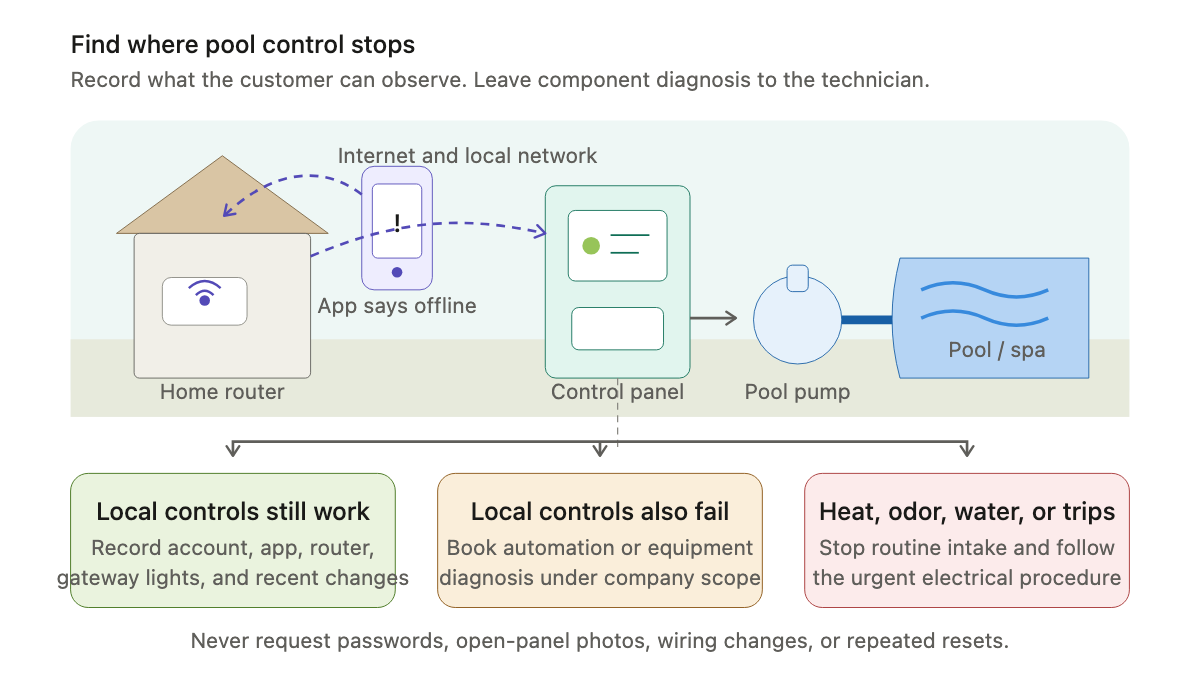
The most useful intake question is simple: “Can you control the system at its normal local panel, and are its existing schedules still running?”
Connected pool control often crosses several links. iAquaLink describes its system as a web-connect device attached to local automation, linked through the owner’s router to web services and apps. Other brands and generations arrange those links differently, but the practical boundary holds. A phone can lose remote control while the local controller and programmed schedules continue to operate.
Ask about three local observations:
- Does the mounted controller or approved local interface have a normal display?
- Did the pump or another scheduled device run at the expected time?
- When the customer uses a familiar local control, does the expected equipment respond?
Keep the questions within the company’s safety policy and the installed manual. Reception should not ask a caller to open an enclosure, touch wiring, remove a cover, bypass a switch, or experiment with unfamiliar controls.
If local controls and schedules work while the app remains offline, record that distinction. The visit or support handoff may center on the account, app, home network, outdoor signal, communication gateway, or a model-specific connection issue. Do not promise which one.
If the local panel is blank, ignores commands, or shows its own fault, the scope is broader. The ticket should say exactly that: “App shows offline; mounted controller display is blank; pump did not run on its usual morning schedule.” That is much stronger than “Wi-Fi problem.”
Record what changed before the connection disappeared
A short timeline can spare the technician a second phone call. Ask when the app last displayed current information and when the customer first noticed the outage. Then ask what changed near that time.
Useful details include a power outage, storm, router replacement, internet-provider change, new network name, changed Wi-Fi password, mesh-network work, app update, phone replacement, automation service, equipment-pad work, or a seasonal pool opening. Record the customer’s account without deciding that the change caused the problem.
Ask whether every authorized user sees the same status. One phone failing while another works is different from every account user losing the property at once. Ask whether the customer can reach other internet services in the home and whether an extender or access point near the equipment pad is powered. Again, write down observations. Network settings and required connection methods vary by model.
Do not turn brand-specific guidance into a universal script. One product may use Wi-Fi, another may use wired Ethernet between a protocol adapter and router, and another may rely on a separate bridge. Radio bands, setup modes, indicator lights, reset sequences, and firmware procedures also vary. Capture the full controller and gateway model before anyone offers instructions.
The existing pool automation installation consultation guide covers compatibility and network planning for a new system. An offline service call begins with what is already installed and what changed.
Preserve model, message, and status evidence
Ask for one wide photo of the equipment pad and closed control enclosures. Add close photos of readable exterior model labels, the local display, and communication-device indicator lights. The customer should take them from a dry, stable location without moving equipment or opening a powered compartment.
Record each item separately. A pool may have one brand on the pump, another on the heater, and a third name on an older automation panel. “Pentair pool” or “Jandy system” is rarely enough. The technician needs the exact controller family, any separate network adapter or antenna, and the specific equipment that no longer responds.
Pentair’s app support sends customers to product-specific support pages when a connected product will not connect. Its FAQ also treats account access, password resets, household access, and professional monitoring permissions as account functions. That supports a firm intake boundary: identify who owns the account and whether login works, but keep credentials out of notes and messages.
A useful evidence packet contains the app screenshot, local-panel photo, adapter or gateway lights, exterior model labels, last-known-good time, current equipment behavior, and recent changes. Ask the caller to leave alerts visible unless the company’s approved procedure says otherwise. Repeated resets can erase the original condition or create a new one.
Screen for electrical and equipment hazards early
An automation complaint can arrive with signs that need prompt human review. Ask whether the customer sees water inside an electrical enclosure, exposed conductors, a damaged cover, smoke, heat, a burning smell, sparking, or a protective device that trips again. Also ask whether powered pool equipment is starting or stopping unexpectedly.
Follow the company’s urgent electrical procedure when any answer is positive. Do not coach the caller through panel work. Keep people away from damaged or wet electrical equipment as directed by the company’s safety policy, and route emergency conditions to the proper local service.
Equipment behavior matters too. A pump that will not start, a heater showing its own fault, a valve stuck between positions, or a cleaner that is not operating may need a pool-equipment diagnostic even when the app also says offline. The pool pump and filter repair intake guide helps document circulation complaints without collapsing them into an automation ticket.
Book the narrowest honest service scope
Read the ticket back before scheduling. A clean summary might sound like this:
“Customer’s pool app has shown the entire system offline since Tuesday evening. Two household phones show the same status. The home internet works. The router was replaced on Monday. The mounted controller has a normal display, the pump ran on schedule this morning, and pool and spa mode still switch locally. Exterior photos show the controller and network adapter models; no damaged enclosure, water, odor, heat, or repeated trip was reported. Account owner will be home and will handle the login.”
That record points toward a connection or account path without claiming a cause. A different summary may justify automation diagnosis: the app is offline, the local display is blank, and scheduled equipment did not run. If one piece of equipment fails while the controller and other devices respond, preserve that narrower equipment symptom.
State the appointment type, diagnostic charge, arrival window, access requirements, and who can approve work. Avoid promising a remote fix, new adapter, controller board, network extender, firmware update, or same-day repair. The field professional must confirm the failure and the service boundary.
The pool service resource hub has related intake guides for salt systems, lights, leaks, and recurring maintenance. An AI receptionist can collect the same approved fields after hours, including the exact message, local behavior, model photos, and change history. The technician should open the work order knowing whether the customer lost a phone connection, local control, one piece of equipment, or the whole system.
Sources
- Pentair: Pool App FAQs
- Fluidra: Why does my device appear offline in the Fluidra Pool app?
- iAquaLink: iQ900 support